Posts

Four Months Building a Domain Research Platform: What I Learned

Earlier this year I set out to build a SaaS platform for domain name research — a tool that helps investors find newly registered domains and expiring auctions worth buying, backed by real business signals instead of gut feeling. Four months and a hundred-plus commits later, it's live. Here's what the journey actually looked like. What the platform does The core idea: a domain name is more valuable if real companies are already using that name. So the platform cross-references millions of domain candidates against company datasets — LinkedIn company data, Crunchbase, funding records — and surfaces metrics like "how many companies use this keyword" and "does the .com resolve to a funded startup." Users can filter new registrations and live auctions by dozens of these signals, save filter sets, and even schedule automatic bids on auctions. Tech stack: React 19 + Vite on the frontend (deployed to Azure Static Web Apps), ASP.NET Core 8 API on the backend, SQL Se...

Implemented a Service to receive real time message from an API Webhook

Image
 What is the webhook?  Ask Google :) 😅  This is my experience to build a Azure Function HTTP trigger to receive an event from SkyBox API Webhook.  Business requirement: Real time integration INVOICE with SkyBox API Webhook. Means whenever SkyBox has a new or Update invoice. Their service would send the json message to my API. Solution:  Step 1: Built C# HTTP trigger function and then deploy it to Azure Function Depends on the business requirement, you can add more in your own code.  Step 2:  Added a subscription sending a POST to https://skybox.vividseats.com/services/webhooks {   "topic" :  "INVOICE" ,   "url" :  "https://xxxxxxxxinvoice.azurewebsites.net/api/SkyboxReceiveInvoice?code=xxxxxxxxxx" ,   "headers" :  "Bearer: xxxxxxxx" ,   "secret" :  "yoursecretkey" } Navigate to Azure Function Monitor to see the message coming. Note: The "secret": "yoursecretkey" is using for Encrypted...

Gitlab - CICD to Azure App Service with an application .NET Framework

Image
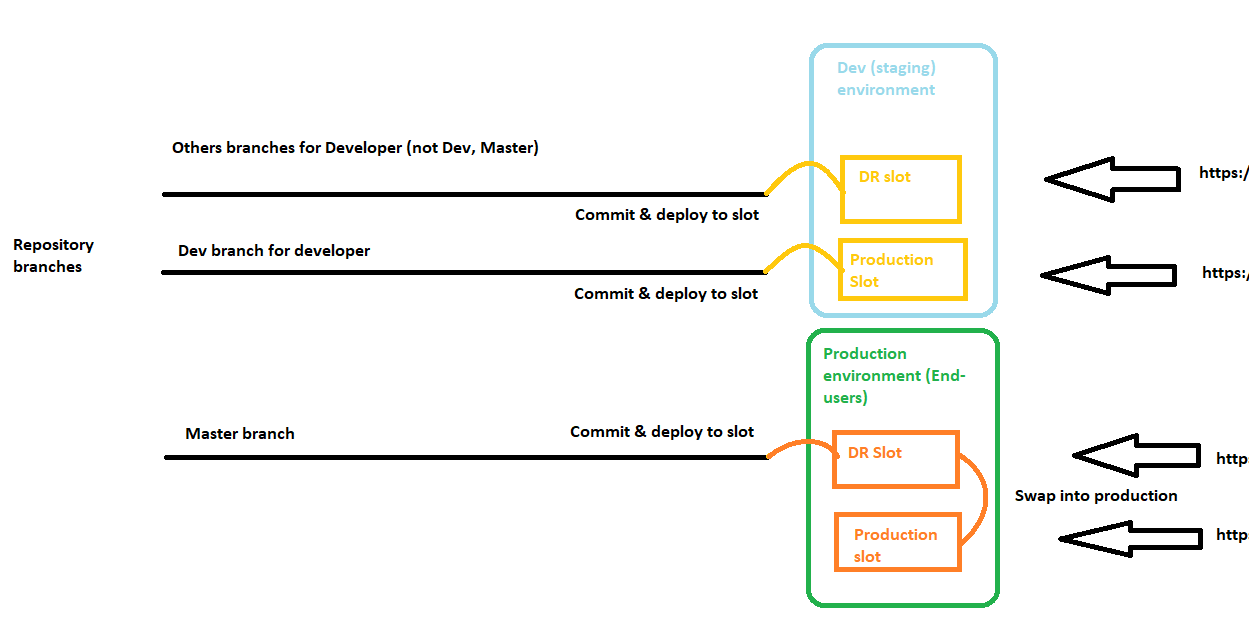
Every development team has unique requirements that can make implementing an efficient deployment pipeline difficult on any cloud service. This is a process to prevents downtime:  Here is CICD script: variables: MSBUILD: "C:\\Program Files (x86)\\Microsoft Visual Studio\\2019\\BuildTools\\MSBuild\\Current\\Bin\\msbuild.exe" SOLUTION: IProcessorSolution.sln WEBJOB_PROJECT: ".\\IProcessorPdfParser\\IProcessorPdfParser.csproj" DEV_PUBLISH_PROFILE: "IProcessorWebsiteStaging - Web Deploy" DEV_PUBLISH_PROFILE_WEBJOB_PROJECT: "IProcessorWebsiteStaging - Web Deploy.pubxml" DEV_DR_PUBLISH_PROFILE: "iprocessorwebsitestaging-dr - Web Deploy" DEV_DR_PUBLISH_PROFILE_WEBJOB_PROJECT: "iprocessorwebsitestaging-dr - Web Deploy.pubxml" PROD_DR_PUBLISH_PROFILE: "iprocessorwebsite-dr - Web Deploy" PROD_DR_PUBLISH_PROFILE_WEBJOB_PROJECT: "iprocessorwebsite-dr - Web Deploy.pubxml" stages: - build - deploy d...

How to setup P2S VPN to connect Azure SQL

Image
After successful building the VPN connection to Azure Environment by applying P2S VPN. This is a note what I did so that I can use it in the future.   Script Powersell to create SelfRoot & Client $cert = New-SelfSignedCertificate -Type Custom -KeySpec Signature -Subject "CN=VNETROOT" -KeyExportPolicy Exportable -HashAlgorithm sha256 -KeyLength 2048 -CertStoreLocation "Cert:\CurrentUser\My" -KeyUsageProperty Sign -KeyUsage CertSign New-SelfSignedCertificate -Type Custom -DnsName TANLECLIENT -KeySpec Signature -Subject "CN=VNETCLIENT" -KeyExportPolicy Exportable -HashAlgorithm sha256 -KeyLength 2048 -CertStoreLocation "Cert:\CurrentUser\My" -Signer $cert -TextExtension @( "2.5.29.37={text}1.3.6.1.5.5.7.3.2" )   Generate and export certificates for P2S: PowerShell - Azure VPN Gateway | Microsoft Docs   Step-by-Step guide to Azure Point-to-Site VPN - Technical Blog | REBELADMIN ...

Business case: Create the alert message to Slack with MS Flow/Automate

Image
 Business case: Automatically post the alert message when it hits the criteria by using the store procedure in MS SQL Azure Solution: Assumption that we already had the data as following by writing it in the store procedure.

Business case: Monitor mailbox and auto-save the attachment to a SharePoint

Image
Business Case: - Monitors a shared mailbox for messages that contain the words "expense report" - Saves the attachment to a SharePoint Library called ExpenseReports - Marks the email as Read - Marks the email as Complete  Solution: Enter a value for Flow name, and then search the triggers for When a new email arrives in a shared mailbox (V2): Select SharePoint site Mark as read Flag email Result:

Business case: Holiday Request

Image
  Business case: Create one Holiday request by using Microsoft Forms, Team, Power Automate (Flow), Exchange Resolve: - Create one form - Add link to Teams - Create the flow + Select "When a new response is submitted" + Next step, get response details + Next, Get manager + Next, Send an approval + Next, Apply the condition Done!.... Test result: